



Made for people.
Built for productivity.

Discover what you can achieve with Time Whip. From small teams to large enterprises, we help you stay organized and get more done.

Collaboration

Collaborate in Real Time

Work together with your team, track progress, and achieve more with seamless collaboration tools.

Collaboration

Visualize Your Success

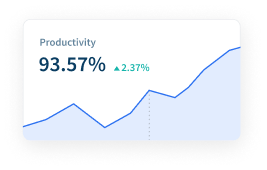
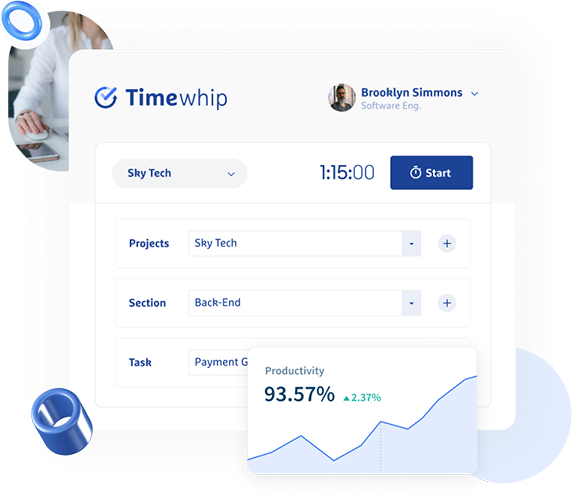
Track your achievements and stay motivated with beautiful analytics and progress reports.

Analytics

AI-Powered Time Tracking and Productivity Analytics

An experience crafted with users in mind. Monitor productivity, track time, and optimize your workforce with intelligent insights and comprehensive reporting.

Work time tracking

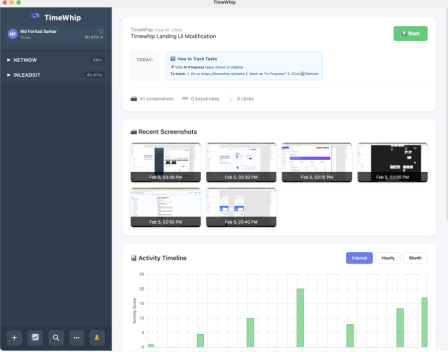
Track work hours with real-time monitoring and detailed reports. Generate comprehensive insights on productivity patterns.

Internet and app usage

Monitor time spent on apps and websites with detailed insights. Understand productivity levels across different platforms.

Screenshot monitoring

Capture periodic screenshots for transparency and productivity. Ensure accountability with visual work verification.

Attendance tracking

Monitor presence, absences, breaks, and time off in real time. Streamline attendance management across teams.

Team Collaboration

Work together seamlessly with your team members.

Unusual activity detection

Detect irregular work patterns and receive productivity alerts. AI-powered insights for better workforce management.

Want to see how it works?

See how easy setup can be—our video guide walks you through it in just five steps.

How it works

3 Simple Steps to Boost Productivity

Capture employee activity

Capture employee activity

Capture employee activity including hours worked, schedule adherence, location policy compliance and app & website usage.

Analyze productivity trends

Analyze productivity trends

Analyze productivity trends on employee focus, engagement and utilization to make data-informed decisions on resource allocation.

Optimize team performance

Optimize team performance

Optimize team performance with benchmarks, goal-tracking and AI coaching recommendations to improve workforce productivity.

Platform Features

Dashboard & User Interface

  • Centralized overview with key company metrics
  • Real-time attendance, hours worked, and clock-in/out list
  • Quick action buttons for adding clients, projects, tasks, or teams
  • Recent activity and task status display
  • Intuitive left-hand navigation bar for modules

Client Management

  • Centralized client list with status and filtering
  • Pop-up form for adding new clients
  • Detailed client profile and business info
  • Client-specific project lists and editing

Department Management

  • Departmental list with employee count and financials
  • Budget and salary overview per department
  • Add, edit, and delete departments with confirmation

Project Management

  • Projects organized by client with status and priority
  • Quick actions for view, edit, delete
  • Comprehensive project details and kanban task board
  • Quick add task, task progress, comments, and editing

Task Management

  • Centralized task list with filtering and search
  • Task details, creation, editing, and collaboration
  • Kanban board integration and notifications
  • Optional fields for dependencies, tags, and acceptance criteria

Attendance Management

  • Real-time daily attendance overview and stats
  • Detailed attendance records with filter/search
  • Add, edit, and view attendance history
  • Attendance reports, reminders, and notifications

Employee Management

  • Comprehensive employee directory with key info
  • Add, edit, and manage employee details and salary
  • Status and role management (User/Admin)
  • Password and profile management

Auth Management

  • Standard login with "Remember me" and password recovery
  • User roles and permissions (Admin/User)
  • Welcome and update notification emails

Notification Management

  • Notification center with bell icon and dropdown
  • Task, project, and system notifications
  • Status indication and clear all option

Settings Management

  • Tabbed settings for company info, office time, system, mail, and bank details
  • Branding, localization, and workday configuration
  • Mail and bank settings for system operations

User Profile Management

  • Personal info, profile picture, and password management
  • User list with filtering, search, and role/department assignment
  • Add/edit user forms and permission management
200
Countries Worldwide
156k
Registered Users
23k
Small & Big Companies

TESTIMONIALS

What our Client Says

Jhon Scot

Jhon Scot

CEO, Company

"The power of using custom reports to track & find a more productive way to work. Features are organized to work in a way that makes sense for your team, making it look like readable English. The power of using custom reports to track & find a more productive way to work. Features are organized to work in a way that makes sense for your team, making it look like readable English."

Charles Edward

Charles Edward

CTO, TechCorp

"The power of using custom reports to track & find a more productive way to work. Features are organized to work in a way that makes sense for your team, making it look like readable English. The power of using custom reports to track & find a more productive way to work. Features are organized to work in a way that makes sense for your team, making it look like readable English."

Sarah Johnson

Sarah Johnson

Product Manager

"Time Whip has revolutionized how our team collaborates. The intuitive interface and powerful features make project management a breeze. We've seen a 40% increase in productivity since switching to Time Whip."

Michael Chen

Michael Chen

Design Lead

"The design and user experience of Time Whip is outstanding. It's rare to find a tool that's both powerful and beautiful. Our entire design team loves using it for project coordination."

Simple, Transparent Pricing

Choose the plan that fits your team. No hidden fees.

Free
$0

Free plan with basic features

Get Started Free
  • Max Clients: unlimited
  • Max Companies: unlimited
  • Max Projects: 3
  • Max Tasks: unlimited
  • Max Users: unlimited
  • Screenshots Retention (months): 1
Basic Plan
$3 /30 days

Perfect for growing businesses

Start Basic Plan
  • Max Clients: unlimited
  • Max Companies: unlimited
  • Max Projects: 10
  • Max Tasks: unlimited
  • Max Users: unlimited
  • Screenshots Retention (months): 2
Pro Plan
$7 /30 days

Advanced features for large organizations

Start Pro Plan
  • Max Clients: unlimited
  • Max Companies: unlimited
  • Max Projects: unlimited
  • Max Tasks: unlimited
  • Max Users: unlimited
  • Screenshots Retention (months): 3

Discover what you can achieve
with Time Whip.